Cat v Box

UP by Jawbone


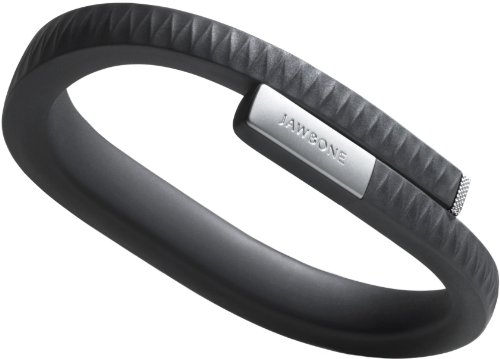
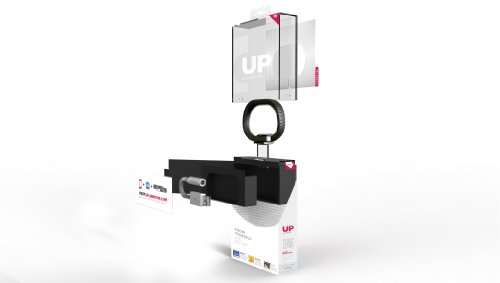
I was intrigued by something I saw on Amazon today.  It’s called UP by Jawbone:


\

Wii Disney Just Dance – What Does Dad Think?

We got the Disney Just Dance Wii game this Christmas.   I will say that the game is a lot more fun than I thought it was going to be.

As a Dad of 4, I thought this game was going to be a great way to keep the kids busy and active while they were stuck inside the house this winter.  After watching just a couple rounds, I found myself up and looking for the spare Wii remote.

I never knew just how hard it was to keep moving to the beat.  Song after song, I think I’ll get the hang of this right around April :)

All the songs inside the game (song listing below) were nice and clean, and even included some of the classics I used to hear when I was a kid.

Our Favorites Just Dances and Scoring?:

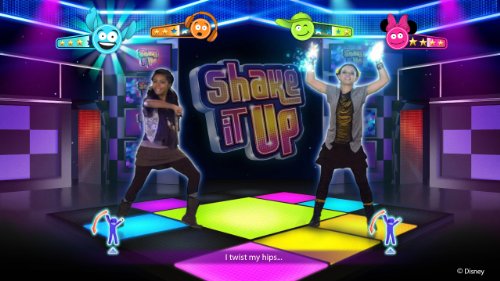
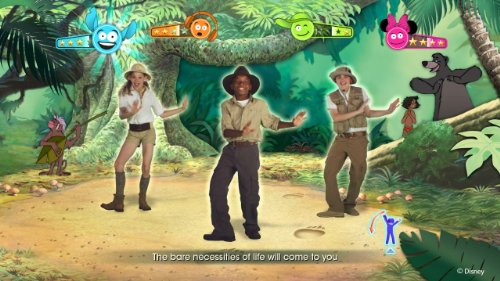
Shake it up, SIMP – Squirrels in my pants, This is me and Bear Necessities are our favorite grooving tunes.

Shake it UP:
Bear Necessities:
Like I said above, the dances took a little time for me to get the hang of.  At first, I didn’t know how the game was actually scoring anything I did.

If you look at the pics above, there are 4 little ‘guys’ at the top of the screen.  They tell you how you are doing.

This is the one I saw all the time at first:


When he makes an ‘uh-oh’ sound, that means you missed something.

After a while, when I learned to move on the beat to the music, I started seeing more of these guys:


When they are happy and you are moving on the beat, then give you a big smile and throw little stars out.   If you keep moving to the beat, you eventually get a little ‘flame’ growing at the end – which means you are on fire!

After about a day, I was able to keep up with the wife and kids.  I even won a couple rounds :)


Wii Just Dance Disney Party Songs:

The kiddos love the songs inside this game, and we find ourselves looking for them all around the web.  Since I only found a few places with a full listing, I thought I would list them here for you:

Wii Just Dance Disney Party Song Listing:

  • The Bare Necessities – The Jungle Book
  • Be Our Guest- Beauty and the Beast
  • Bibbidi-Bobbidi–Boo- Cinderella
  • Calling All the Monsters- A.N.T. Farm
  • Everything Is Not As It Seems – Wizards of Waverly Place
  • Ev’rybody Wants to Be a Cat- The AristoCats
  • Fly to Your Heart- Tinker Bell
  • Following the Leader-Peter Pan
  • Hang In There Baby- Good Luck Charlie
  • Hawaiian Roller Coaster Ride- Lilo & Stitch
  • Hey Jessie – Jessie
  • Hoedown Throwdown- Hannah Montana: The Movie
  • I Thought I Lost You- Bolt
  • It’s a Small World – It’s a Small World
  • I’ve Got a Dream- Tangled
  • The Muppet Show Theme- The Muppets
  • Shake It Up- Shake It Up
  • S.I.M.P.Squirrels In My Pants- Phineas and Ferb
  • Something That I Want- Tangled
  • Supercalifragilisticexpialidocious- Mary Poppins
  • That’s How You Know- Enchanted
  • This Is Me- Camp Rock
  • Twist My Hips- Shake It Up
  • Under the Sea- The Little Mermaid
  • We’re All In This Together- High School Musical


Tons of Fun – Even for the Dads!

If you are looking for a great way to keep your kids active, (and tire them out for bed) this is a great game to have.

Many great dances, all clean and all age friendly.  I’m sold, and off dancing :)

Wii Just Dance at Amazon


This post was created using the BlogProfitPro

Look-alike Dragonvale Costumes – Scary and Fun!

If your son or daughter plays Dragonvale, you can bet they would like to dress up as one this Halloween!

Since they don’t have actual Dragonvale costumes, you can find costumes that look just like the favorite characters in the game.

Here are a couple that might turn your little one into a scary monster!

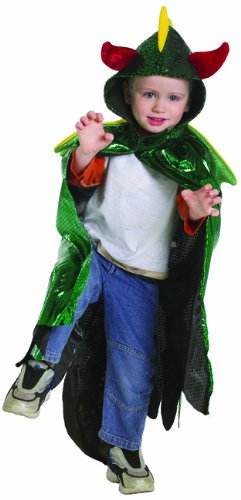
The Plant Dragon Costume Look-alike:

This head-dress and cape looks like one of the favorites of the game – the Plant Dragon.

Grab the Plant Dragon Look alike Costume at Amazon


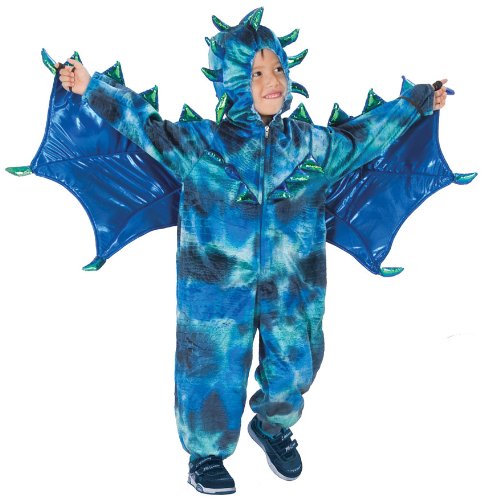
The Rain Dragon Costume Look-alike:

The rain dragon is a favorite in the Water habitat.  This look alike costume costume would definitely work.

The reviews on this one says the sizes run a bit small, so be sure to order a size up or 2 for your child.

The Rain Dragon Look-alike Costume at Amazon


The Fire Dragon Costume Look-alike Head:

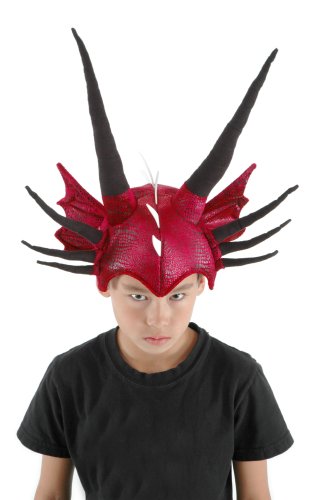
This one looks like the Fire Dragon’s head.  This would work great with a red cape.

Fire Dragon Look-alike costume at Amazon


Baby Cold Dragon Costume Look-alike:

This costume is for the little guys and gals.  Newborn and baby sizes.

Baby Cold Dragon Costume Look-alike


Lava Dragon Costume Look-alike:

This costume is actually from the movie How To Train Your Dragon, but it also looks like the Lava Dragon.

Lava Dragon Look-alike at Amazon


Streaming Netflix in the Car

Streaming Netflix In The Car

Having movies in the car is a must for those that travel frequently.  As a family, we can put on thousands of miles a year, travelling to see family and hitting our favorite camping destinations.

Having videos in the car gives us quiet kids (for our sanity), and gives our little ones something to do other than ask ‘are we there yet’!

Ever since we got our iPhone, we have been able to successfully watch netflix vids while on the go.  With just a couple iPhone attachments and the right know-how, it is pretty easy to accomplish.

Here are the things you need to make this work:

1.) iPhone or a phone that can do video out.  Standard Video or HDMI??

Most in car video solutions have inputs for standard RCA video (the red, white, and yellow connectors).

The easiest way to hook up Netflix streaming in your car is to have a phone that has video out functionality.  This is different from HDMI.  As of this writing, the iPhone 4s, 4, 3S have direct video out, making these phones perfect for in car streaming.

Cable for iPhone/iPad.

Since iPhones and iPads have video out capability, they are perfect for streaming netflix in the car.

You will need the video out cable which can be purchased for under $30:

iPhone Video Out Cable

Link for iPhone/ iPad video out cable

Most Android phones have been made with HDMI outputs recently.  I have had a couple phones where HDMI is available, and standard video is not.  If this is the case, you can still stream videos to standard RCA video, but you will need a HDMI to RCA video adapter as pictured below:

HDMI to RCA Converter

HDMI to RCA Converter


2.) Hooking up your phone to your video player.

In our minivan, we have a built in DVD player that has video inputs.  It is a bit of a pain because the video inputs are way in the back row of the minivan.  We needed to use a couple adapters and extensions to make it work.  Some cars have this connection closer to the front.

Video Input Hookup Streaming Netflix

Since this connection is way in the back, we have a long RCA cable plugged in that goes all the way to the front of the car.

In our minivan, the audio ports that are used here only go to the headphones in the back seats.  This would normally be fine with us, but we find it is more trouble trying to keep those headphones on their heads.

Instead we port the sound through the main radio in the front.  Here is a pic of the adapter cable up front:

Streaming Netflix, Car Adapter

You can see the RCA extension adapter plugged into the red cable.  (I used a red cable because I had one laying around, the normal color of this connector is Yellow – which is the Video part of the cable).

The USB connector plugs directly into a car USB power adapter.  I like the dual port one that can charge the iPhone and another device at the same time.

Dual USB Car Adapter

Power Gen Dual Car USB Adapter

Notice the audio cables are not hooked up here either.  We grab the audio right from the phone with the headphone jack.

Streaming Netflix Hookup Pic

Here we have the connections ready to go.  When I get into the car, I just pop the phone into the holder and plug away.  This gives me easy access to the phone.

The best holder I have found for the iPhone is the iGrip (pictured above).  You can get it for under $10 on Amazon.

Our minivan does not have an MP3 connection, so we go old school with the tape cassette converter.  When we have the video playing, we just change the selector to ‘Tape’ and then fade the sound to the back of the van.

This has worked really well for us.  The only time you might have problems is if you travel in the ‘boonies’ a lot.

 For just a couple bucks (and a Netflix account of course), you can have a much larger selection of videos at your fingertips for those large trips.

No Netflix Account Yet??

Here is an offer to get 1 year free subscription to try them out:

Netflix Special 1 Year Offer

How ’bout you?  How do you cope with the long trips?